Where Do You Put the Privacy Policy on Your Website?
.png)
You've created your website privacy policy... now what? Where the heck are you supposed to put the privacy policy on your website?
Kudos to you for creating your privacy policy. That is a big first step to getting your website fully legal.
Trouble is that creating your privacy policy is only the first step. Now you have to actually get it on your website, and a lot of people get confused about exactly where they should put it and whether they need to include links or not.
Never fear... in this post, we'll help you figure it all out.

Step One: Create a Privacy Policy Page
Now, technically, you could comply with your legal obligations by putting your privacy policy on your homepage. (No, seriously, one of the privacy policy laws actually says this!)
But, err, you probably shouldn't do that.
Instead, you'll create a standalone privacy policy page. Simply create a new page on whatever platform you use for your website and give it a simple url... something like: YourAwesomeSite.com/privacy-policy.
This page doesn't need to be fancy. In fact, most people just copy and paste the text of the privacy policy they've created onto a simple white background on their site.
Once you've created and published your new Privacy Policy Page, move on to step two.
Step Two: Add Links To Your Privacy Policy Page in the Footer Navigation

Once you have your standalone privacy policy page, it’s time to add links to it in your footer navigation. To satisfy the privacy policy laws, you need to include clear links to your privacy policy on basically every page of your site.
That means including a link that includes the word "Privacy" and is easy to see against the background of your site.
Just like the URL for your privacy policy page, there's no reason to get fancy with the links. Just go with "Privacy Policy" in your footer navigation. Here's a snapshot of one part of our site-wide footer navigation:
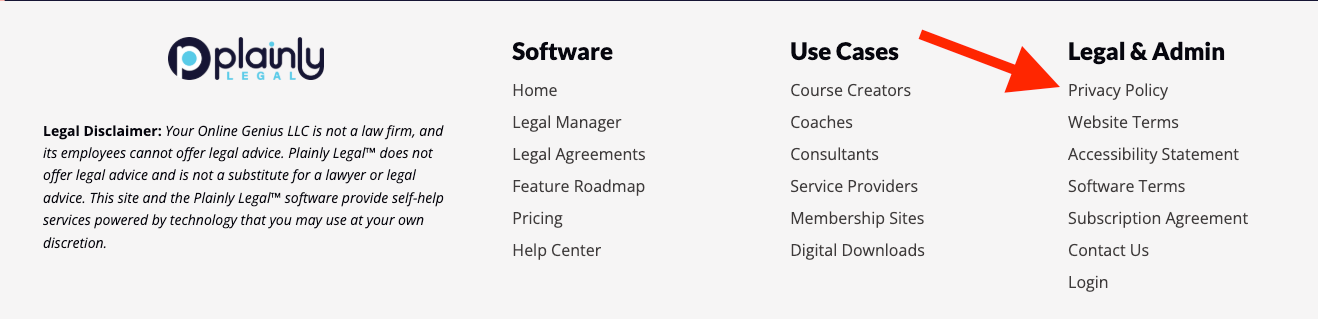
You'll normally include that link right next to your links to your Terms of Use... and it will normally be right near the copyright notice for your site.
Once you've taken care of getting a link into your standard footer navigation, it's time to get links in pages that DON'T have that footer navigation.
Step Three: Add Links To Your Privacy Policy Page on All Landing Pages

If you're following digital marketing best practices, your site is going to have some landing pages that don't include your standard navigation because you are minimizing the number of potential clickable links on those pages.
Your standalone opt-in pages, for example, generally shouldn't have your standard navigation menus because you want people to have a single choice... opt-in or not!
These landing pages are often the pages on your site where it's MOST important to have a link to your privacy policy because they are often the pages where you are collecting the most personal data from people.
So, you need to make sure to add links to pages that do not have the standard footer navigation bar.
You can often do this by creating a simpler footer navigation bar for these pages. A navigation bar that only includes links to your three legal policies.
Another option is to include a link to your privacy policy right next to any button where people opt-in or take action on your site. This is an elegant solution because it puts the link in immediate view when people are submitting their information.
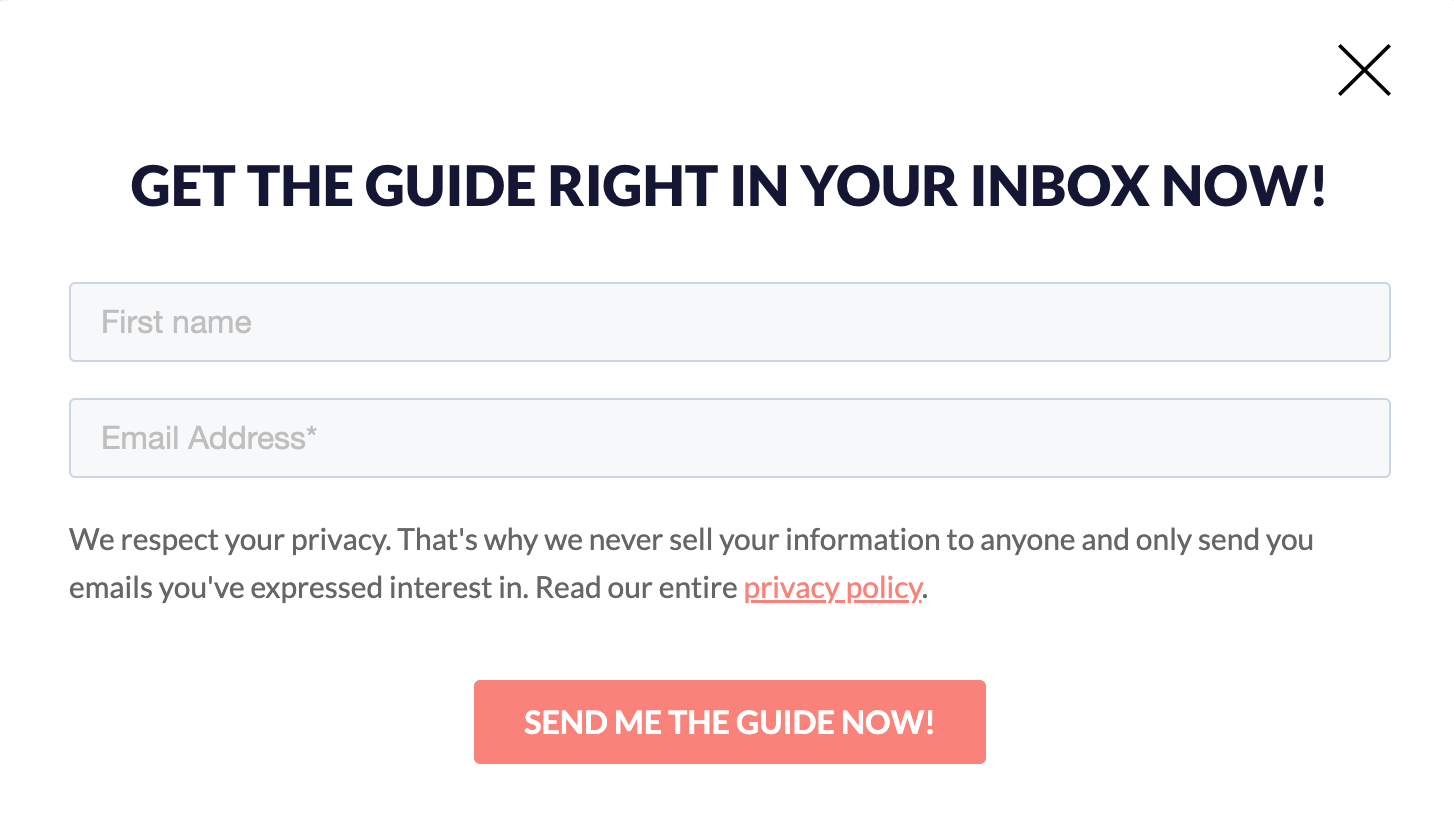
We go with the belt and suspenders approach and include a link on the opt-in form and in the simple footer.
So there you have it. What to do with your privacy policy in three simple steps.
Now go take action!